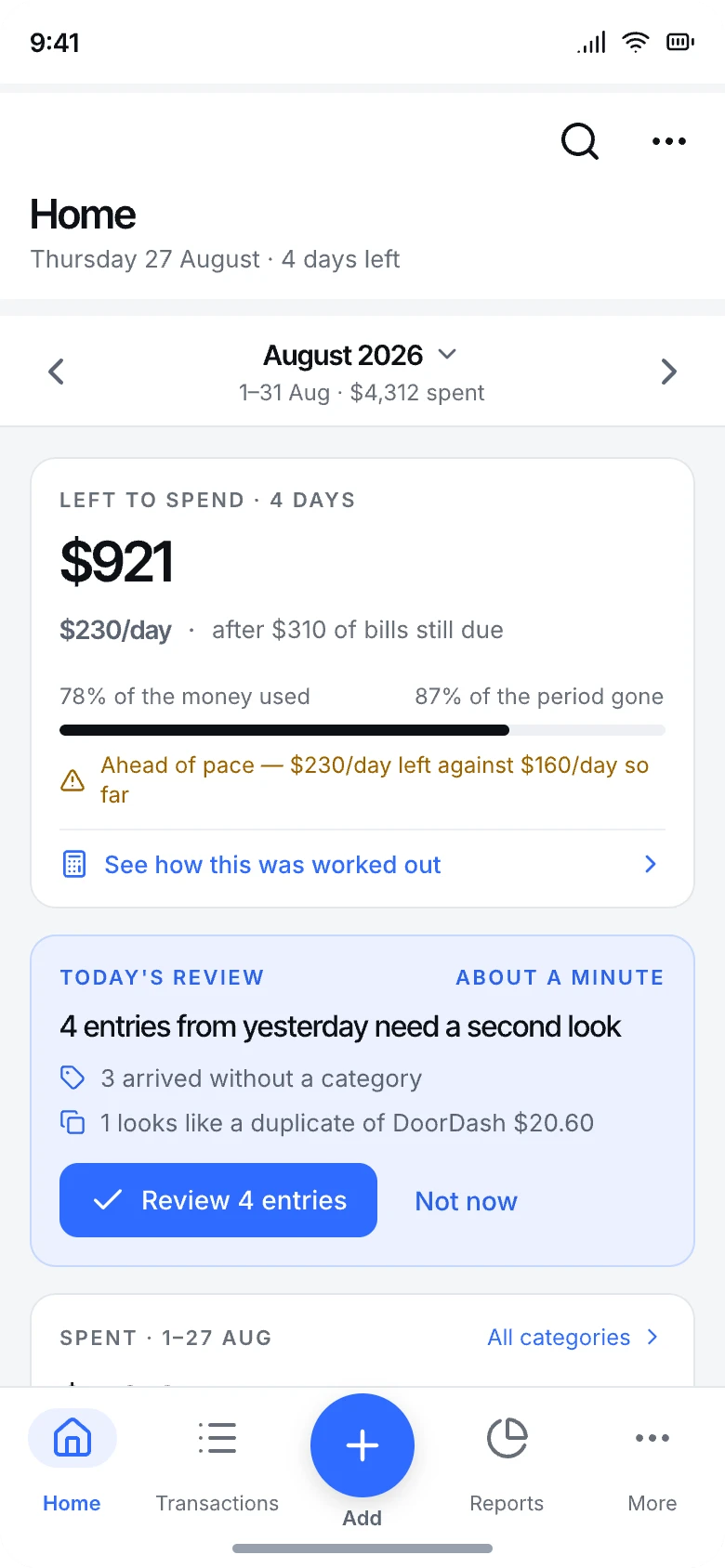
Tap a spend in, say it, or snap the receipt. See where it went, and know what is left before the month runs out. All kept on your phone, with an account only if you want one to sync and back up.
Nothing to load, and nothing waits for a connection.
Account optional
Open it and start writing. Sign in later to sync.
No ads, ever
Your habits are not the product.
Any currency
Spend abroad, report at home.
Features
Everything you need to see where your money goes
Nothing to connect to your bank. Write things down, say them or snap them, and CashSpell does the counting.
Add it your way
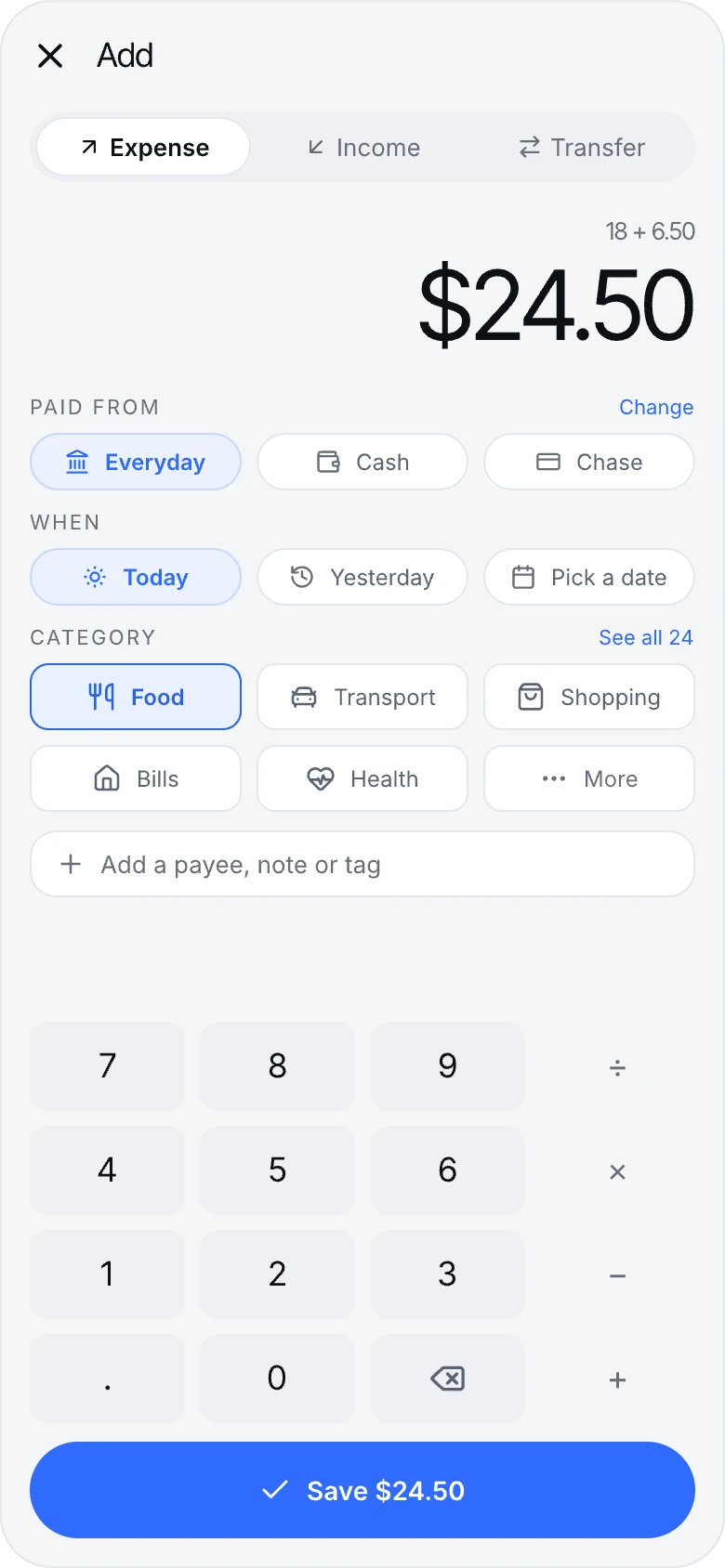
Tap it, say it or snap it
Amount, category, save: the everyday entry takes three taps. With a plan, scan the receipt, or say "lunch twelve dollars from cash" or type it as a sentence, and CashSpell fills in a card for you to check. Nothing is saved until you confirm it.
Expenses, income and transfers, on any date
Voice and typed sentences with Pizza Max; speech is recognised on your phone, and no audio leaves it
Receipts with Burger Pro: scanned, picked from photos or shared in, PDFs too
Transactions
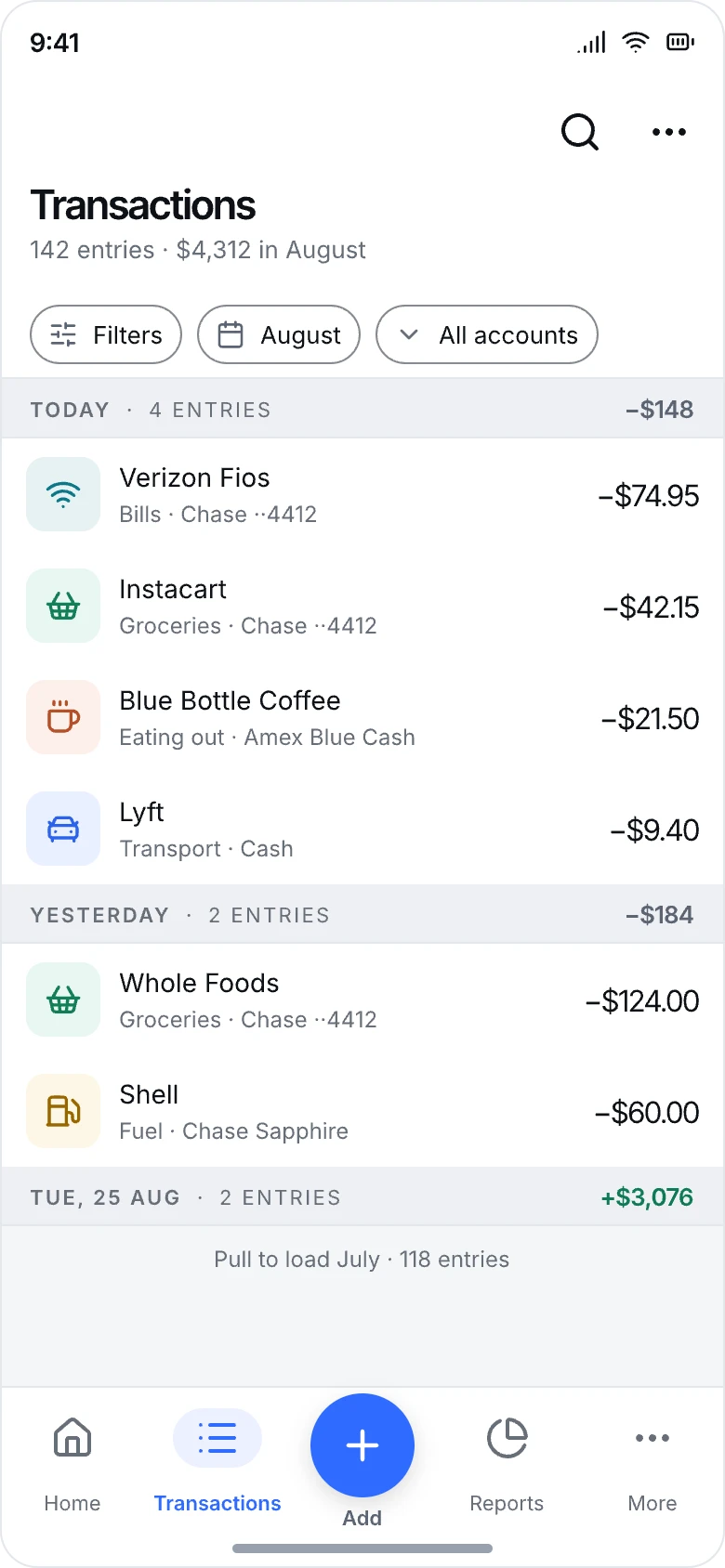
Every entry, grouped by day
Your whole history in one calm list. Search it, filter it down to one account or category, and bring back anything you deleted from the Trash.
Search across everything you have written
Filter by account, category and dates
A Trash for second thoughts
Budgets, goals and debts · Burger Pro
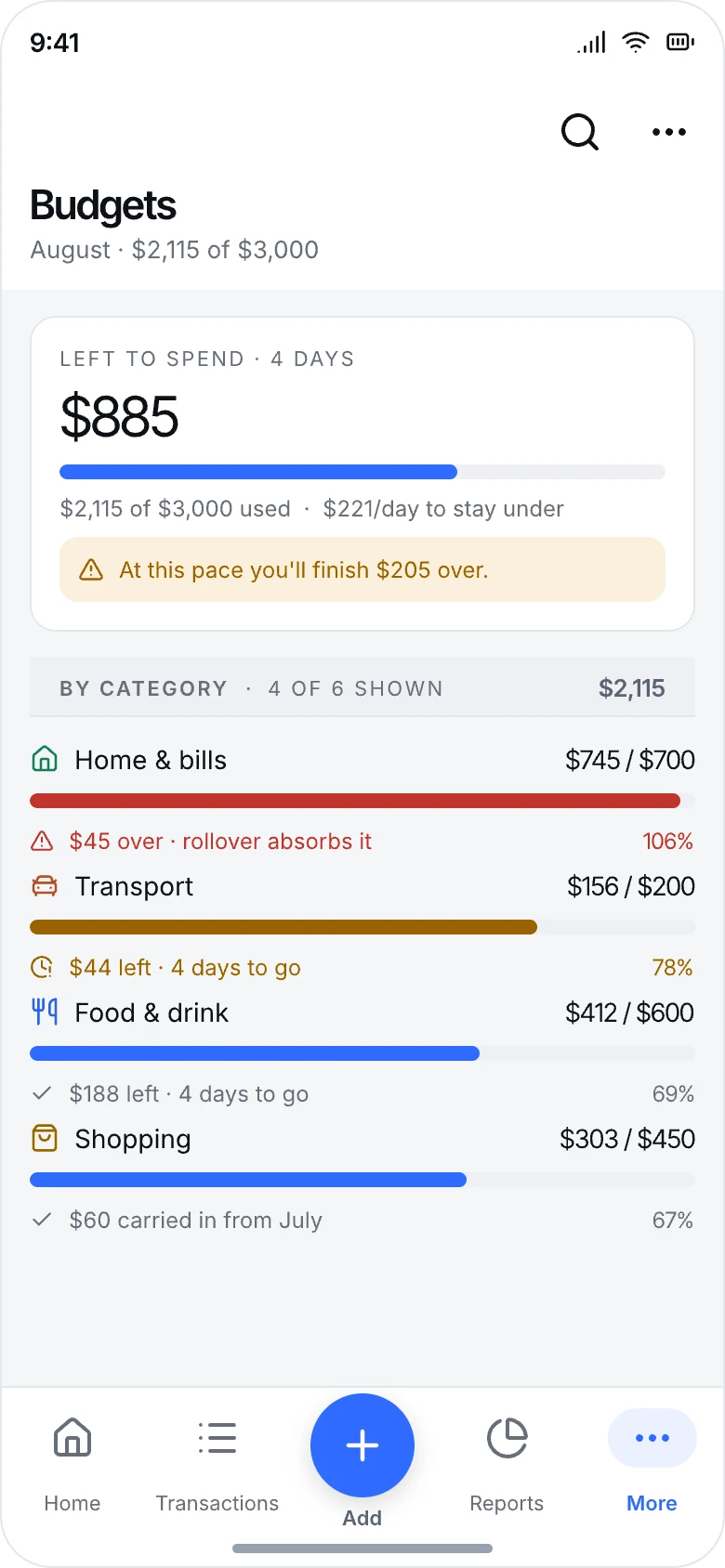
Know before you overspend
Set a cap for any category and watch it fill as the month goes on. CashSpell tells you when you are ahead of pace, not after the money has gone. Save towards goals with a plan to get there, and keep track of what you owe and are owed.
A budget for any category
Pace warnings part-way through the month
Savings goals and debts in the same place
Reports
See exactly where the money went
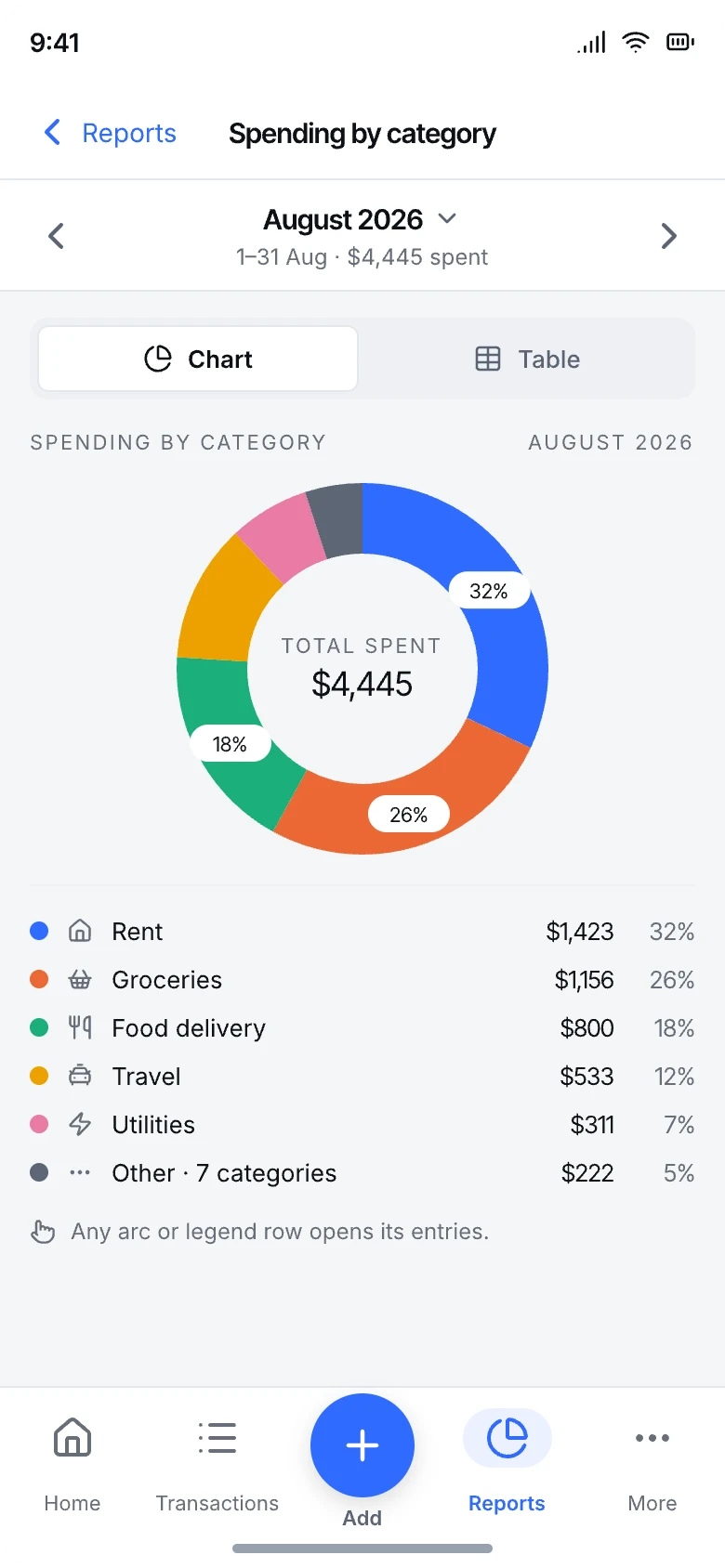
Every category ranked and totalled for any period you choose. Tap a number to see the entries behind it.
Spending by category at a glance
Any month, or any range of dates
Every total opens the entries inside it
Trends
Watch the months line up
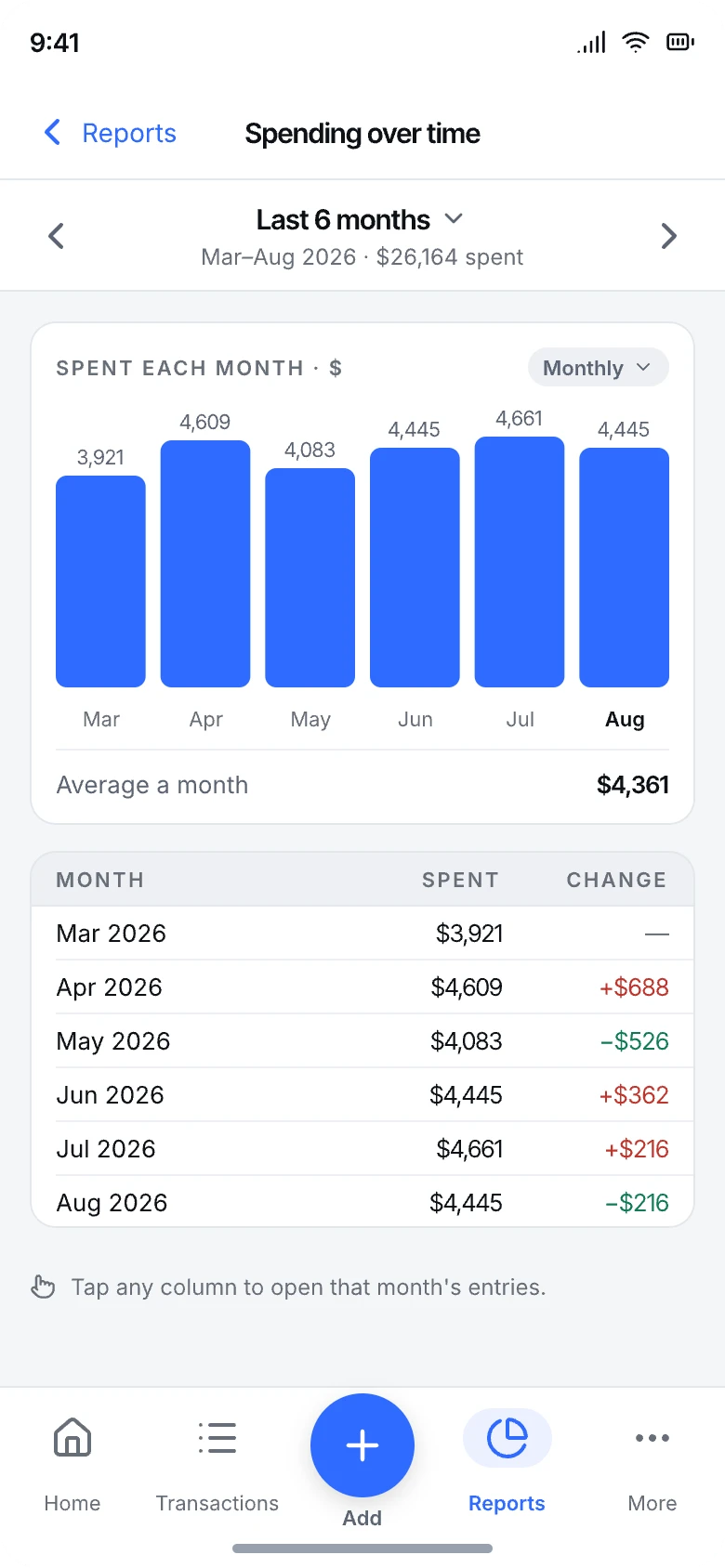
Compare period against period and catch the drift early, before a habit becomes a hole in the budget.
Month-by-month spending side by side
Day-by-day rhythm within a month
Months that start on payday, if you like
And more
The whole picture, not just the list
Some of these come with a paid plan, named on each card. Everything else is free.
Receipts, kept
Scan one or several, and the merchant, total, date and items are read on your phone into a draft. The image stays with the entry. Burger Pro.
Receipts by email
Forward an emailed receipt to your own private address and it waits in the app as a draft. Pizza Max.
AI that does the typing
When you allow it, what you say, type or photograph can be read by an AI service for a sharper card. You still confirm every entry. Pizza Max.
Net worth
Add what you own and what you owe, record new values over time, and watch the total move. Pizza Max.
Insights
Duplicate charges, unusual spending, price rises, forgotten subscriptions and a tight week ahead, each with the entries behind it. Pizza Max.
Can I afford this?
Ask before you buy, and see the forecast for the rest of the month behind the answer. Pizza Max.
Habits that stick
A logging streak, a look back at your week, and reminders to log at the times and days you choose. A month-end review with coaching comes with Pizza Max.
Groups, free
Share a trip or a household. Invite people with a link, add shared expenses and see who owes whom until you settle up.
Recurring and rules
Bills that repeat, what is coming up, money you are waiting for, templates and rules that fill entries in. Coffee Plus.
Sync and backups
Sign in and your ledger is on every phone you use. Back up on the phone, or to the cloud, encrypted, when signed in.
Widgets and shortcuts
On Android, home-screen widgets for adding an expense and for what is left to spend. On both phones, press the app icon to add by voice or scan a bill.
Help, even offline
Searchable answers in the app, plus a way to contact support or request a feature from inside it.
Plans
Free to start. Buy us a treat for more.
Each paid plan includes everything in the one before it. Pay monthly, or yearly and save about 16%.
Free
$0
No account needed
Up to 50 personal expenses; income and transfers are unlimited
Groups and shared expenses
Accounts, categories, reports and trends
Sync, and backups on the phone and in the cloud
Coffee Plus
$1.99 a month
or $19.99 a year
Unlimited expenses
App lock with a PIN or biometrics, and hide from recent apps
Recurring, upcoming and awaiting
Templates, rules, import and export
Burger Pro
$3.99 a month
or $39.99 a year
Everything in Coffee Plus
Budgets, goals and debts
Receipts: scan, attach and keep up to 10 images an entry
Pizza Max
Most popular
$4.99 a month
or $49.99 a year
Everything in Burger Pro
AI help: voice entry, typing a sentence and receipt reading
Insights, monthly coaching and the month-end review
Net worth and Can I afford this?
Receipts by email
Prices are in US dollars; your store shows the price in your currency, and it may include tax. Paid plans are auto-renewing subscriptions, bought through the App Store or Google Play, and renew at the same price each month or year until you cancel. Cancel at any time in your store's subscription settings, at least 24 hours before the renewal date, and the plan stays until the end of the period you paid for. If a plan ends, nothing you made is deleted. See the subscription terms.
Privacy first
Your money stays yours.
Most money apps ask for your bank login and send your spending to a server. CashSpell never asks for your bank login, and what you write down is kept on your device. It goes to our server only if you sign in to sync it, and it is never sold or shared with advertisers.
Without an account, nothing you write leaves your phone. Usage analytics is anonymous and never includes your entries: in the EU, EEA, UK and Switzerland the app asks first, and elsewhere it is on until you turn it off in Settings › Privacy.
Read on your phone first
Speech and receipts are read on your phone. AI help in Pizza Max sends the words or the receipt to an AI service only after you allow it, and those services may not train on it.
Locked with a PIN or your face
App lock comes with Coffee Plus. Only a one-way hash of your PIN is kept, fingerprint and Face ID stay with your phone, and your balances stay out of the app switcher.
Yours to take anywhere
Back up whenever you like. With Coffee Plus, export any dates, accounts or categories to CSV or Excel, and send the file wherever you choose.
The details
Small things, done carefully
Every kind of account
Cash, bank, cards and more, each with its own balance.
Any currency
Hold accounts in any currency, converted at rates you set.
Months that start on payday
Pick any day from the 1st to the 28th.
Categories you shape
Add, rename and reorder them to fit your life.
Light and dark
Or follow your phone, day and night.
CSV and Excel export
Any dates, any account, any category. Coffee Plus.
A Trash that forgives
Deleted entries wait there for 30 days.
Archive old accounts
Close an account without losing its history.
Platforms
On your phone, and soon in your browser
Android
On Google Play, with home-screen widgets and receipts shared in from any app.
No. You can use CashSpell without one: open the app, choose your currency, add an account and start writing things down. Sign in with email, Google or Apple whenever you like to keep the same ledger on more than one phone, keep backups in the cloud, join groups, or carry a plan to every phone you use.
What does it cost?
CashSpell is free to download and use, with up to 50 personal expenses, unlimited income and transfers, groups, reports and backups. Coffee Plus ($1.99 a month), Burger Pro ($3.99) and Pizza Max ($4.99) add more, as listed under Plans. They renew automatically until you cancel in your store's settings.
Does CashSpell work offline?
Yes. Entries, reports, budgets, voice entry and receipt scanning all work on your phone with no connection. When you are online, the app also checks that your version is still supported, and it can fetch exchange rates when you tap Fetch rates. Syncing, buying a plan, receipts by email and AI help need a connection.
Where is my data stored?
On your device, in the app's private storage. If you sign in, it also syncs to CashSpell's server so it is on every phone you sign in to. Without signing in, nothing you enter is sent to us or anyone else. The privacy policy has the details.
Is my data used to train AI?
No. AI help is part of Pizza Max and is off until you allow it. Then the words you say or type, or a receipt, may be sent to our AI service providers to fill in a card, and we only use providers whose terms rule out training on it. You can switch it off in Settings › Privacy, and everything is read on your phone again.
What if I lose my phone or forget my PIN?
If you were signed in, sign in again on the new phone, or after reinstalling, and your synced ledger comes back. A signed-in account can also reset a forgotten PIN by signing in again. Without an account we never hold a copy, so we cannot restore your records, and nobody can reset the PIN. Make a backup now and then, or sign in.
Does it connect to my bank?
No, on purpose. You record entries yourself, by tapping, speaking or snapping a receipt, which means your bank login never goes near a third party.
Which devices can I use?
Android phones and iPhone. A plan bought on one works on the other when you sign in with the same account. A web version is on the way.
Start writing things down.
Make every penny count. CashSpell is on Android and iPhone, with the web on its way.